Game Design, Programming and running a one-man games business…

Deprecations all ya need lalalalalalala

Ok, so you have be over 40 to know what the song is or who this guy is…

But anyway… deprecation gets me down. What is deprecation?

http://en.wikipedia.org/wiki/Deprecation

“In the process of authoring computer software, its standards or documentation, deprecation is a status applied to software features to indicate that they should be avoided, typically because they have been superseded”

Sounds reasonable enough but it’s a real pain. I discover today that directinput is ‘deprecated’. presumably Microsoft declared it thus, whilst also being the people who wrote it, and also writing a ton of other stuff that I’m probably not supposed to use anymore, despite the fact that when they released it, they tell everyone it’s the best thing EVER, and we are all luddites for not switching to it.

I really cannot keep up with what is right, and modern and usable and standards-compliant etc, and what is old, unsupported and unhip.

Is C# still cool? what about GDI+ did that even happen? What about DirectX Graphics? or maybe .NET? do people use Java still? and is it OK to use flash? or is it now HTML 5? and is Ruby On Rails new or old now?

I reckon a game developer needs to write at least three whole games using a technology before they really are on top of it. I’m on top of directx9 now, and feel quite confident about it, but I’m pretty sure some genius at Microsoft reckons I should be shot for not using directx 10, or is it 11 or 12 now? or is directx not even used now? How are programmers supposed to keep up? It’s fine if your job is something cushy like ‘engine architect’ where you just go to Microsoft conferences and read technical papers all day, but for people who have to ‘ship an actual product’, we actually have other stuff to do too.

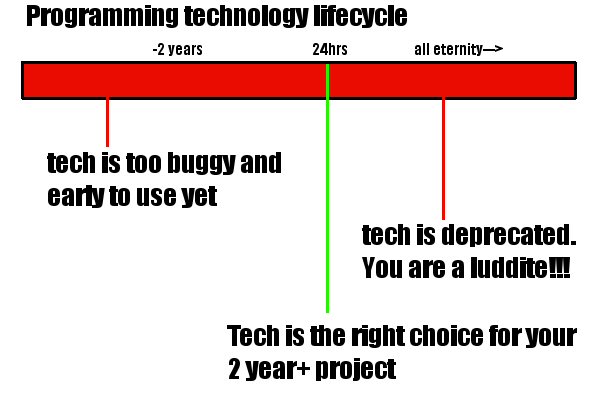
Is it just me? what technology have you finally sat down to use, or ordered a book for, only to discover that all the cool hip kids (ones who never tend to ship anything) already think it’s out of date? I reckon the lifecycle of programming technology goes like this:
Bah…

Getting Gratuitous Tank Battles to run on my laptop

So…. it runs! and it runs in places at 60FPS, but in other places….not.

My dell video card has a 64MB VRAM intel GMA chipset, so hardly a gaming laptop, but my aim was to get GTB to at least run on it, even if the framerate sucked. That way, I know people with 128MB or 256MB cards should be fine, and I’d like to keep the min spec as low as I can.

The game already had a ton of stuff you could turn off, such as shadows, shaders etc, but running it on the Dell, and then profiling it using the awesome free intel GMA tools showed up a ton of stuff that I could do to increase the initial 20FPS rate. These were:

  • Realise that the refresh rate on the dell was set at 40FPS not 60FPS initally, hence making an artificially low limit. DOH!
  • Removing a redundant Clear() at the start of each frame. I fill the screen anyway, so why bother? I don’t use a Z-buffer.
  • Removing some render-target sets and clears when the shader options were turned off. With these off, I can render direct to the back buffer, old-school style and save time on render target changes.
  • Adding code that detects a jpg when loaded, and mip-maps it. Previously, they had no mip maps at all. Could possibly reduce some memory consumption
  • Add a graphical detail slider to options which can turn off a bunch of frilly details like window shadows, and drifting smoke on menu screens.
  • Providing a separate list of lower-res textures that get used in some cases when the graphical detail slider is below 25%. Such as mech legs and the shadow maps for scenarios. Any texture of 2048 or higher gets a lower res replacement. I had tried auto-scaling them on load, but this gave unexplained errors and I don’t trust D3DX to do this reliably on all video cards to be honest, so separate low-res textures it is.

I think the biggest wins were the texture-size reductions and the removal of the render target clears. It was interesting to note that the dell considered the game to be GPU limited, despite it being a fairly old and crappy chip (and only a single core). I guess at 1920×1200 res with all the options on for the desktop, things may be very different though.

Things may start to race ahead from here. The game is definitely very playable in its basic form, with the majority of extra work now likely to be the online challenge and integration stuff. That will take months, but still, the end is definitely in sight.


Knowing what your code does

Do you know how your game works? I bet you *think* you do. And if you do, there are never surprises when you suddenly take a look at a frame of it being rendered. Invariably, mistakes mean stuff works differently to how you intended it to.

I use AQTime, which is pricey as hell, but fantastic, as a profiler. You can control it from code too, so I can pause my game mid-battle, hit ‘F’ to go one frame-advance, and that frame is profiled by aqtime. It then will dump tons of stats, telling we call times and counts for every function (or even line)  and let me see this:

This chart immediately tells me that some lightmapbuffer sprite code was being run. It should be skipped in daylight levels, so clearly I have a bug. And that’s before I even begin to look at performance optimisations in this frame.

If you write big complex stuff and don’t have a professional quality profiler, you need one. They are absolutely fantastic.

Fixing my heap crash bug

Well I did it. I am 99.9% sure I finally crushed my random crash bug. Here are the gory details.

It crashed in debug (or release) and seemingly somewhere random. Possibly much later than the actual cause, as is the way with these things. By using Microsoft’s handy CheckHeap functions, I was able to progressively narrow it down to a certain bit of code. (Essentially you check the integrity of the whole heap at two points, then when one of them triggers, you know whether it was inside or outside the enclosed code.

So what I narrowed it down to was some code that command bunkers, hospitals and repair shops run, where they go through their list of ‘supported’ units (the ones they are affecting) and updates them. Essentially this means telling all the units in the list that they now are not supported, then rebuilding a new up-to-date list. For speed reasons this is only done every X frames.

Now the obvious case for a crash is that some unit that was in the list when we added it, has been deleted, and thus when we go to tell them they are no longer being supported, we write to gibberish and cause mayhem. BUT! I know that this is never the case because no units are deleted mid-battle, ever.

Except that it turns out I’m wrong about that :D. They ARE deleted if… I drop a 25 man squad of infantry into a 12-man trench or bunker. At that point 13 of them get deleted. If I dithered when placing them long enough for a nearby command bunker to ‘claim’ them, then when I release them, I set off a time bomb, and after X frames, the command bunker will write to freed memory and hilarity ensues.

All fixed now, obviously. The easy fix would be to not support units until they are placed, but that isn’t nice for the GUI, and also I needed to rewrite the code to use a different system anyway so that multiple bunkers could overlap (they don’t stack though).

2 days. probably 20+ hours of debugging. What a pain. Insert comment about needing to get my act together regarding smart pointers here.

Bah.